
MySQL to ADLS Gen2 with Azure Data Factory

Move payments data from MySQL into ADLS Gen2 using Azure Data Factory, metadata tables, watermarks, and Synapse validation.
Azure • Foundations • Beginner • Payments

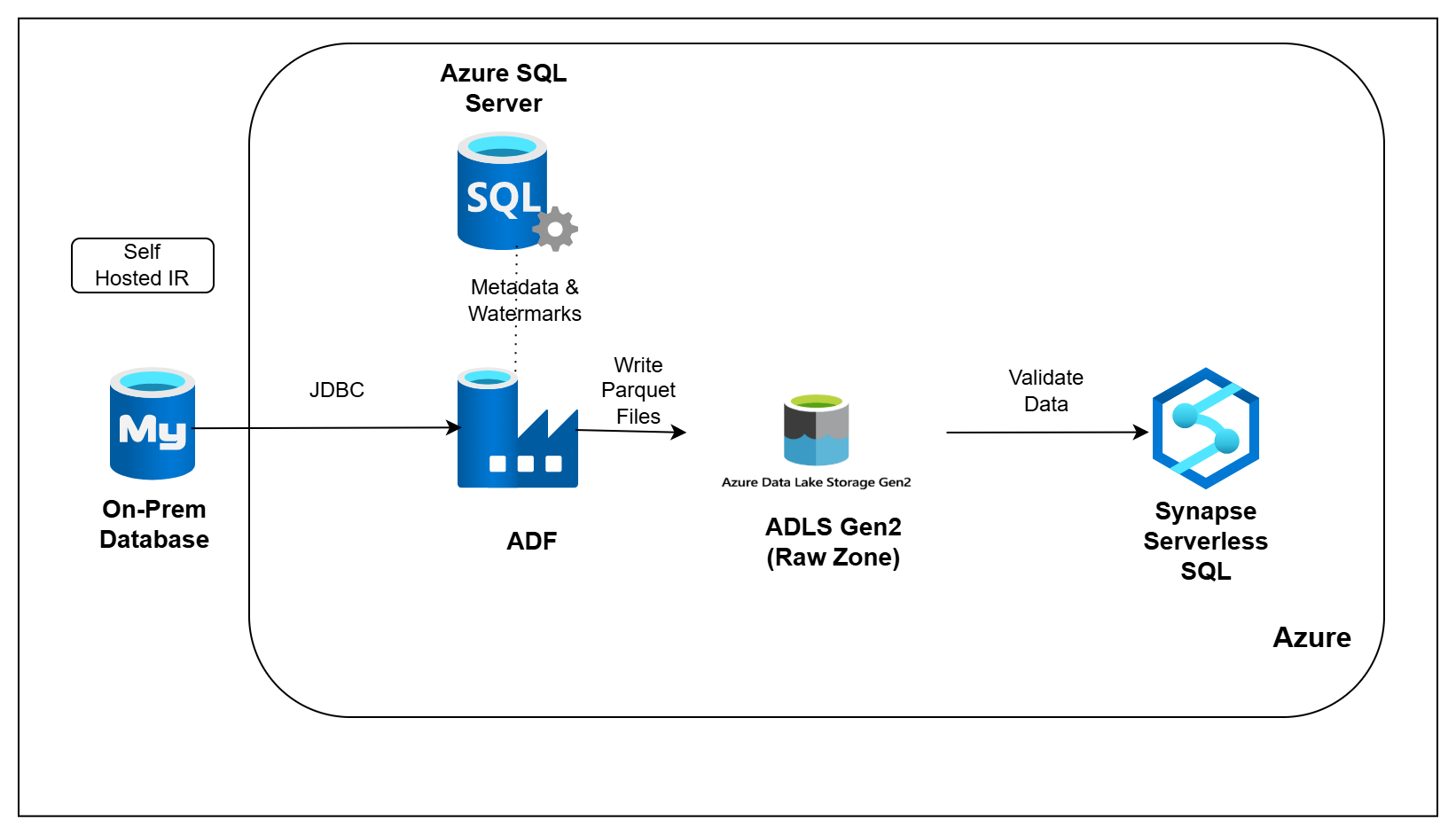
Architecture Diagram

Build this project

Included in Data0to1 Project Library

What this project solves

Payment applications store day-to-day data such as customers, merchants, KYC records, wallets, ledger entries, settlements, refunds, disputes, and device activity inside operational databases.

But analytics teams should not directly depend on the application database for reporting. In real projects, data is usually moved into a data lake first, where other teams and pipelines can safely use it.

In this pipeline, you will move payments data from MySQL into Azure Data Lake Storage Gen2 using Azure Data Factory. You will track each run using metadata tables, use watermarks to load only new or changed records, and validate ingestion results using Synapse Serverless SQL.

What you’ll build

  • Set up a MySQL source database with payments data
  • Create Azure SQL metadata tables to track ingestion runs
  • Configure source entities that need to be loaded
  • Load MySQL tables into ADLS Gen2 raw folders
  • Use watermarks to load only new or changed records
  • Track row counts, run status, and ingestion metadata
  • Validate ingested data using Synapse Serverless SQL

How you’ll build it

  • Prepare the MySQL source, ADLS folders, and Azure SQL metadata tables
  • Configure Azure Data Factory connections and pipeline parameters
  • Use ADF to extract source tables and write files into ADLS Gen2
  • Update watermarks and run metadata after each ingestion
  • Validate the loaded data using Synapse Serverless SQL queries

Tools you’ll use

MySQL • Azure Data Factory • Azure Data Lake Storage Gen2 • Azure SQL Database • Azure Key Vault • Azure IAM / RBAC • SQL

What you’ll walk away with

After completing this pipeline, you will be able to:

  1. Explain how batch ingestion works on Azure
  2. Move MySQL data into ADLS Gen2 using Azure Data Factory
  3. Use metadata tables to track ingestion runs
  4. Apply watermarks for incremental loading
  5. Validate data lake ingestion using Synapse Serverless SQL

Ready to build this project?

Get access to the project code, setup files, architecture walkthrough, implementation videos, and support.