Azure DevOps CI/CD for Data Pipelines

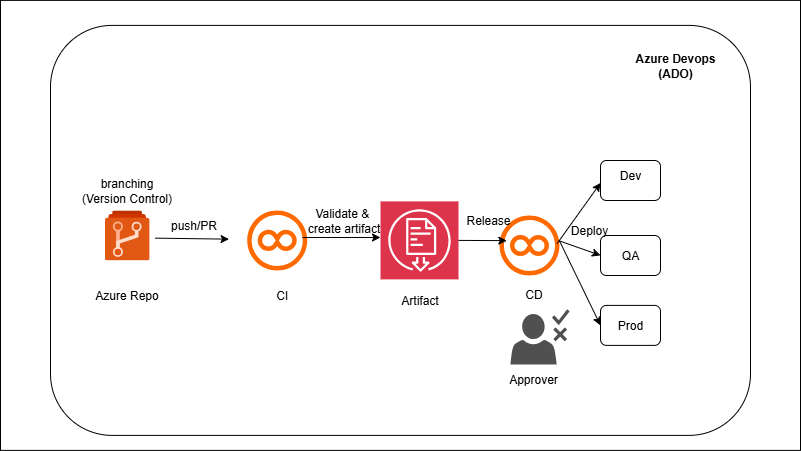
Architecture Diagram

azure-devops-cicd-adf-databricks

Overview

You’ll connect ADF to Git (collaboration branch) so each publish generates ARM templates in `adf_publish`. A build pipeline packages those templates and the Databricks assets (notebooks, job configs). A multi-stage YAML then deploys: Stage Dev runs ARM/Bicep to update ADF and uses the Databricks CLI/dbx to import notebooks and create/update Jobs; the same artifact promotes to QA and Prod with environment-scoped variables and approvals. Secrets (connection strings, tokens) are referenced from Azure Key Vault so no secrets live in the repo.

What You Will Build

  • Azure Repos (mono-repo or split): ADF JSON + Databricks notebooks (repo structure & naming).
  • Build pipeline (YAML) to validate ADF artifacts, lint notebooks, and publish artifacts (ADF adf_publish ARM/Bicep, notebook bundle).
  • Release pipeline / multi-stage YAML to:
    1. Deploy ADF  `az deployment` to each environment.
    2. Deploy Databricks notebooks (Databricks CLI/REST or `dbx`) and update Jobs.
    3. Environments with manual approvals for Prod, variable groups per env.
    4. Key Vault integration for secrets (ADF linked services, Databricks tokens, JDBC creds).
    5. (Optional) Policy & quality gates: branch protections, build validations, unit tests for SQL/py code.

Tech Stack

Azure DevOps (Repos/Pipelines), ADF (Git + ARM/Bicep), Databricks (CLI/dbx/Jobs), Key Vault

Learning Outcomes

  • Git-driven workflows for ADF/Databricks with branch policies and PR reviews.
  • Repeatable releases to Dev/QA/Prod via pipelines, approvals, and variables.
  • Secure secrets through Key Vault-backed service connections.

Recommended Before This

  • Git-driven workflows for ADF/Databricks with branch policies and PR reviews.
  • Repeatable releases to Dev/QA/Prod via pipelines, approvals, and variables.
  • Secure secrets through Key Vault-backed service connections.